Java Image Viewer (View)
This tool is aimed at those users who need to maintain a large number of graphic images stored in multiple directories.
Besides the basic viewing features, it provides a powerful renaming function that allows the user to easily rename
files to names that contain a sequence number for easy reference.
This utility requires java 1.4 runtime available
from http://java.sun.com/.
Price: $10.00 U.S. - Contact me at [email protected]
Functions (Screenshots are at the bottom of the page, requires
Functions (Screenshots are at the bottom of the page, requires
java 1.4 runtime available from http://java.sun.com/):
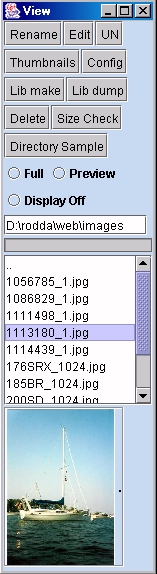
Rename:
Before clicking on rename on the main view screen,
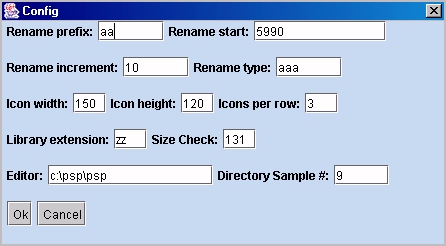
on the config screen specify rename increment
value, rename starting numeric value, rename prefix, and rename file type. The values will be saved. When you click rename, View will traverse all sub-folders and rename files to pppxxx.ttt where ppp = prefix, xxx = numeric value, and ttt = type.
Values can be any length. For every directory entered, xxx will be incremented by "rename increment"
If a filename is specified in the box below "Display off" and a file is selected, it will be renamed to the filename specified. Clear the box to make rename traverse directories (which is the default).
Be careful with rename!!! If you are not in the directory tree where you want to be, files in the current directory and
all sub-directories will be renamed according to the process described above (double check your location).
Edit:
View will run editor specified on config screen and pass the selected filename on the command line.
UN:
View will rewrite the JPEG file header to all files in the directory. The new files will have the UNH file type.
Thumbnails:
Creates thumbnail window where clicking on a thumbnail will cause the image to be displayed in the full window if enabled.
Window will be created using information from config screen: icon width, icon height, and icons per row.
Config:
Change config values.
Lib make:
Make library file.
Lib dump:
Unload library file.
Delete:
Delete selected file(s).
Size check:
Look for file of certain size. Java console window needs to be open
Directory sample:
View will traverse directories and create a thumbnail window displaying the file sequence
that you specified on the config screen. For example if you specified 5 for the directory
sample, view would display the 5th file on the thumbnail screen from all traversed directories.
Full:
Displays full view of image as you click on file names or click on thumbnail.
Preview:
Displays thumbnail of images when you click on a directory. For example if you had 50 directories
of images, as you clicked on the directory name, a thumbnail window would be displayed with the
images in that directory. If the full window is displayed, clicking on a thumbnail will display
it in the full window.
Display off:
Turns display off. You may want to do this when deleting files so the file isn't locked by
the viewer. It can keep you from deleting files.